
Download Lock Launcher Widget – iPhone App, Free Tool, iOS 16.4, Graphic & Design
Overview
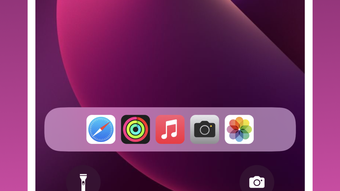
Lock Launcher Widget is a free iPhone application developed by Revoo Teknoloji Limited Sirketi, designed to enhance the user experience on iOS devices. Positioned within the Graphic & Design category, the app aims to provide a streamlined way to access frequently used apps directly from the lock screen. This functionality addresses the common need for quicker navigation without unlocking the device, offering a convenient shortcut for users who rely on specific applications throughout the day. The target audience includes everyday iPhone users seeking efficiency and professionals who manage multiple tasks across different apps. While the developer’s background is limited to the company name, the app’s release on the App Store indicates a commitment to platform standards and distribution reliability. Real-world usage scenarios include accessing a calendar, messaging app, or camera with a single tap from the lock screen, reducing time spent navigating through home screens. The software was published on Softonic on February 1st, 2024, and is compatible with iOS 16.4 or later, ensuring access to modern device features.
Key Features & Capabilities
- Lock Screen Access – Allows users to launch selected apps directly from the lock screen, minimizing steps required to open frequently used tools.
- Widget Integration – Incorporates a customizable widget that appears on the lock screen, providing visual access to app shortcuts.
- Language Support – The app is available exclusively in English, ensuring consistent interface clarity for English-speaking users.
- Free-to-Use Model – No cost is associated with downloading or using the application, making it accessible to a broad audience.
- Compatibility with iOS 16.4+ – Designed to function on devices running iOS 16.4 or higher, ensuring alignment with current Apple ecosystem standards.
These features support a more efficient workflow by reducing the number of interactions needed to access essential apps. For example, a user can quickly open a note-taking app or check their calendar without fully unlocking the phone. The widget’s placement and customization options, while not detailed in the provided data, are expected to follow iOS design guidelines for consistency. The app’s focus on minimalism and direct access aligns with modern user expectations for speed and simplicity in mobile software. As a free tool, it offers value without financial commitment, making it suitable for both casual users and those managing time-sensitive tasks.
User Interface, Workflow & Performance
The user interface of Lock Launcher Widget is designed to integrate seamlessly with the native iOS lock screen experience. It leverages Apple’s widget framework, ensuring a familiar look and feel that aligns with system-wide design principles. Navigation is intuitive, relying on standard touch gestures such as tapping or swiping to interact with the widget. The workflow is optimized for speed, allowing users to launch apps with minimal input, which enhances usability in high-pressure or multitasking scenarios. The app’s performance is expected to be stable, given its integration with Apple’s ecosystem and adherence to platform-specific development standards. However, exact performance details such as CPU or RAM usage were not specified by the developer. The developer did not provide additional system requirements or resource usage information. Based on general software behavior patterns, the app is likely to operate efficiently with low impact on device performance. Stability is anticipated due to App Store distribution, which enforces quality checks and security protocols.
Compatibility & System Requirements
Lock Launcher Widget is designed to run exclusively on iOS devices, specifically those with version 16.4 or later. This ensures compatibility with modern iPhone models that support the latest iOS features, including enhanced widget functionality and improved lock screen interactions. The app has a file size of 11.3 MB, which is relatively lightweight and suitable for devices with limited storage capacity. Installation is handled through the App Store, streamlining the process and ensuring secure delivery. The developer did not specify additional hardware requirements beyond the operating system version. As such, exact performance benchmarks or device-specific compatibility details were not provided. Compatibility information was partially provided, focusing on OS version and file size. Users are advised to verify their device’s iOS version before downloading to ensure full functionality.
Pros and Cons
Pros
- Free to download and use, offering no financial barrier to entry.
- Integrates directly with the iOS lock screen for quick access.
- Lightweight file size (11.3 MB) suitable for most iPhone storage capacities.
- Available on the App Store, ensuring secure and verified distribution.
- Designed for iOS 16.4 or above, ensuring compatibility with current devices.
Cons
- Language support is limited to English only.
- Exact system requirements beyond iOS 16.4 were not disclosed.
- Performance and resource usage details were not provided by the developer.
- Only available on iOS, limiting cross-platform accessibility.
- App functionality is restricted to the lock screen, with no additional features described.
FAQ Section
Is Lock Launcher Widget available for free?
Yes, Lock Launcher Widget is a free application. It can be downloaded and used without any cost through the App Store.
What iOS version is required to use this app?
The app requires iOS 16.4 or a later version to function properly. Users should ensure their device is updated to meet this requirement.
Can I use Lock Launcher Widget offline?
Yes, once installed, the app can be used without an internet connection. It operates locally on the device.
Is the app safe to download from the App Store?
Yes, the app is distributed through the official App Store, which enforces security checks and developer verification, ensuring a safe download experience.
Does the app support languages other than English?
Currently, the app is available only in English. No additional language options are available at this time.
Final Thoughts
Lock Launcher Widget presents a practical solution for iPhone users seeking faster access to essential apps from the lock screen. Its free model, lightweight design, and integration with Apple’s ecosystem make it a compelling choice for those prioritizing efficiency. While the app’s feature set is focused and limited, it delivers on its core promise: quick, direct access to frequently used applications. The absence of detailed system requirements or performance data is a minor drawback, but the App Store distribution mitigates many risks associated with third-party software. The exclusive English interface may limit accessibility for non-English speakers, but the app remains highly functional for its intended audience. For users who value speed and simplicity in daily iPhone interactions, Lock Launcher Widget offers a reliable and secure tool. Download Lock Launcher Widget now.







